
Software, tools & examples
Planning tools, programming examples and technical workflows for your iQunet installation.
Choose where to start
ModVibe RS-485 Planning Calculator
Explore cable length, device count and baudrate for a ModVibe RS‑485 bus.
Revision 1.1
Scope & requirements
Explore cable length, connected devices and baudrate for ModVibe and HELUKABEL 81910 PUR under the stated engineering assumptions.
A topology estimator, not an installation qualification. Its endpoint-source model does not validate the complete half-duplex bus.
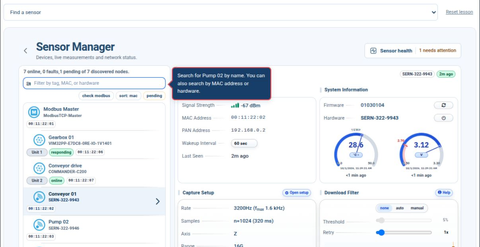

M4 interactive software manual
Follow interactive tutorials for sensors, alarms, vibration analysis, dashboards, network settings and data interfaces.
Software 1.16.5
Software versions
Check the version shown on your gateway before choosing a manual or requesting an update.
Earlier M4 release notice
The M4 release notice covered the 1.15.x software series and introduced the virtual demonstration linked below.
M4 virtual demonstration
Explore the M4 software through the iQunet demonstration environment.
Demo access
Sign-in is required by the demo host.
Request an iQunet Server update
Provide the server ID and installed system details. Keep the server reachable through the supported remote-access connection for an arranged update.
Unsure which workflow or example applies to your equipment?
Ask about the software connectionWork with the data directly
Original iQunet examples for device discovery, measurement access, plotting and export. Use the files that match your API and programming language.
iQunet Sensor Network programming examples
Python and JavaScript examples for retrieving device lists and measurements through OPC UA and GraphQL.
Scope & requirements
Match example dependencies and API fields to your installed software version.
GraphQL
GraphQL device list in Python
Retrieve connected devices using GQL.
GraphQLGetDeviceList.py
GraphQL device list in JavaScript
Retrieve connected devices using graphql-request.
GraphQLGetDeviceList.js
GraphQL vibration data in Python
Retrieve and plot vibration data for a chosen period.
GraphQLGetVibrationData.py
GraphQL vibration data in JavaScript
Retrieve and plot vibration data for a chosen period.
GraphQLGetVibrationData.js
GraphQL mutation examples
Examples that change vibration sensor parameters. Review the operations before adapting them to a device.
GraphQLmutations.py
OPC UA
OPC UA device list
Retrieve connected devices with opcua-asyncio.
OPCuaGetDeviceList.py
OPC UA vibration data
Retrieve and plot vibration data for a chosen period.
OPCuaGetVibrationData.py
OPC UA measurement data structure
Read vibration measurements in the time and frequency domains, in g and mm/s.
OPCuaGetVibrationDataStruct.py
OPC UA anomaly model data
Retrieve and plot anomaly model data for a chosen period.
OPCuaGetAnomalyDetectionData.py
Plot a two-dimensional vibration orbit
Retrieve measurements and plot a two-dimensional orbit.
OPCuaPlotOrbitData2D.py
Export a spectrum to CSV
Export frequency-domain X-axis data to CSV files.
OPCuaDumpVibrationDataAsCsv.py
Follow a complete technical workflow
Anomaly detection: a three-part series
Start with the introduction, then continue through the learning method and bearing-damage example.
Part 1/3: Introduction
Introduction to anomaly detection with MEMS vibration sensors and machine learning.
Part 2/3: Deep Learning
The machine-learning part of the three-part vibration series.
Part 3/3: Bearing Damage Detection
Bearing-damage detection in the final part of the series.
Monitoring Power Quality in Industrial Equipment
Technical background on ESA and power sensors for power-quality monitoring.
Publish Modbus over MQTT, plot in Python
Follow the original integration tutorial from Modbus measurements to MQTT and a Python plot.
LoRaWAN Temperature Data to Python Graph
Connect LoRaWAN temperature measurements to a Python graph through the documented OPC UA workflow.
Technical background and applications
Watch an application example or open the complete presentation, architecture reference or technical paper.
Original iQunet application videos
Presentations and technical paper
Edition details
January 2026 filename
Edition details
January 2026 filename; March 2026 upload
Edition details
Historical presentation; March 2023 filename
Case-specific observations and earlier dashboard screens. Product and service details reflect the original presentation.
Edition details
Historical presentation; August 2022 filename
Earlier sensor architecture and software. The examples do not establish performance or compatibility for every current installation.
Edition details
July 2023 filename
Edition details
October 2021 filename
Edition details
November 2023 filename
Edition details
January 2023 filename
Solution leaflet
Edition details
March 2025 filename